Homework - Seepage/Slope Stability Integration
This problem corresponds to the Johnson Reservoir example from the XSLOPE documentation:
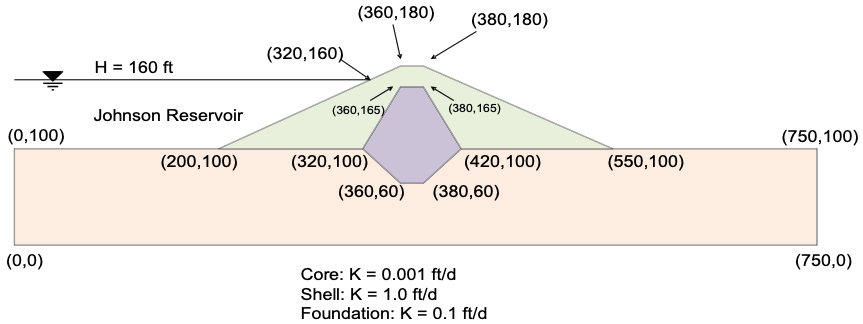
we will combine seepage and slope stability analyses using XSLOPE. We will first run a seepage analysis to compute pore pressures and then use those pore pressures in a slope stability analysis.
Use the XSLOPE Google Colab seepage notebook for the seepage analysis:

Use the XSLOPE Google Colab LEM notebook for the slope stability analysis:
Instructions
- Download the following Excel input file:
- The strength parameters for the three materials are:
| Material | γ (pcf) | Option | c (psf) | φ (deg) |
|---|---|---|---|---|
| Shell | 130 | mc | 100 | 35 |
| Core | 125 | mc | 400 | 18 |
| Foundation | 127 | mc | 100 | 27 |
Enter the material properties into the mat sheet of the Excel input file. Set the pore pressure option for each material to seep.
-
Upload the Excel file to the seepage notebook and run the seepage analysis. After the analysis is complete, download the zip archive that the notebook generates. The archive contains the Excel input file, the mesh file, and the seepage solution. Also download the PNG of the seepage solution plot.
-
Upload the zip archive to the LEM notebook and run the slope stability analysis. The pore pressures from the seepage solution will automatically be used in the stability analysis. Download the PNG of the slope stability solution plot.
Submission
Save a copy of your Excel input file and a PNG of the solution plots (both seepage and slope stability). Zip up your files into a single zip archive. Upload your zip archive via Learning Suite.
Grading Rubric
| Criteria | Points |
|---|---|
| Material properties (γ, c, φ) entered correctly for all three materials | 8 |
Pore pressure option set to seep for all materials |
4 |
| Seepage analysis runs successfully and solution is reasonable | 7 |
| Slope stability analysis runs successfully using seepage pore pressures | 7 |
| Seepage and slope stability solution plots saved as PNGs | 4 |
| Total | 30 |